Instagram Checker
An app that returns a list of Followers the user isn't following back & Followers not following the user back
How to Export Files from Instagram
First, go to Instagram and go to the settings. Select the "Meta Account Center" (See image 1).
Then navigate to "Your information and permissions" > "Download your information". This will pop up a window. Click on the "Download or transfer information" (See image 2).
You will be given options for what you want to download. I recommend selecting "Some of your information" and then checking off the "Followers and Following" under the Connections section. Then click "Next". On the next screen, select "Download to Device". I would recommend setting the Media quality to low. Also this is important: Make sure to select the format as JSON.Once you have updated those settings, click "Save", which will put in your request.
It will take some time for the files to be created so whenever you get an email saying your download is ready, come back and download the files. Once your files have been downloaded, unzip them and upload the "followers_1.json" and "following.json" files into the box.
Image 1: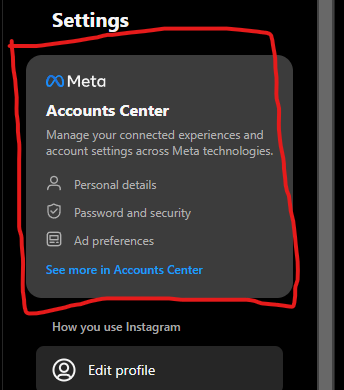
Image 2: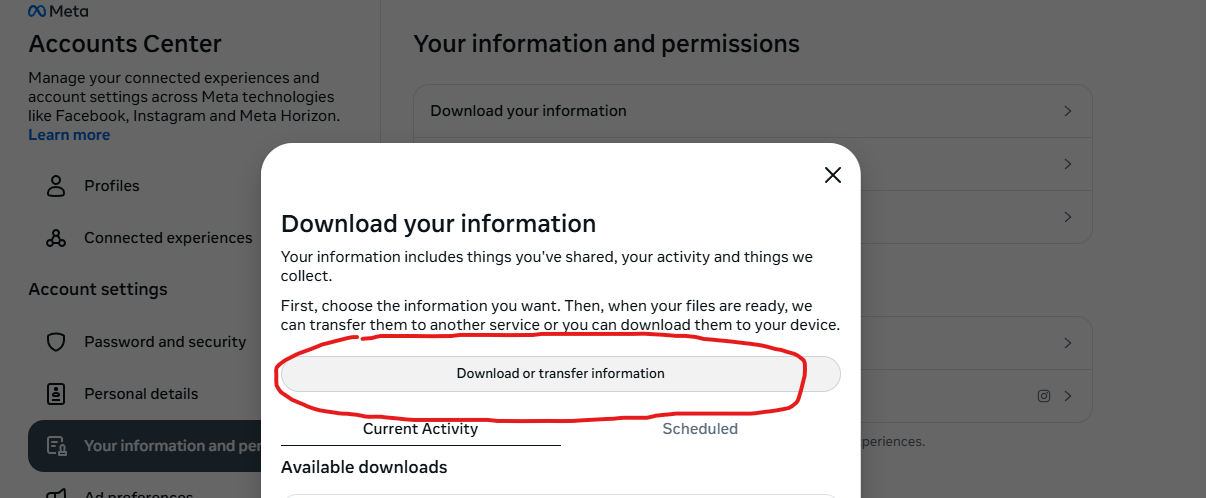
Then navigate to "Your information and permissions" > "Download your information". This will pop up a window. Click on the "Download or transfer information" (See image 2).
You will be given options for what you want to download. I recommend selecting "Some of your information" and then checking off the "Followers and Following" under the Connections section. Then click "Next". On the next screen, select "Download to Device". I would recommend setting the Media quality to low. Also this is important: Make sure to select the format as JSON.Once you have updated those settings, click "Save", which will put in your request.
It will take some time for the files to be created so whenever you get an email saying your download is ready, come back and download the files. Once your files have been downloaded, unzip them and upload the "followers_1.json" and "following.json" files into the box.
Image 1:
Image 2: